
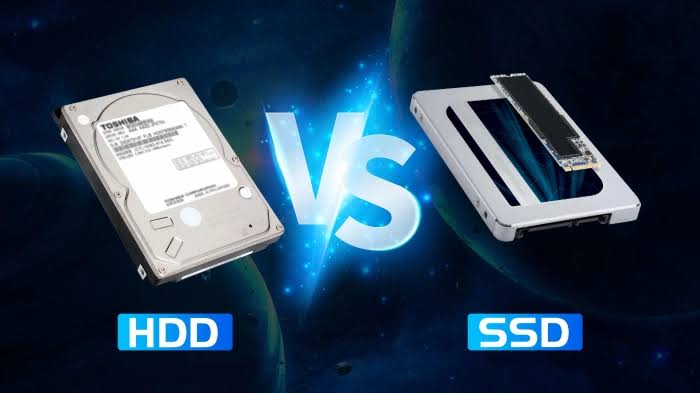
SSD vs HDD in 2026: Which Storage Is Better for Your Laptop?
Choosing the right storage is one of the most important decisions when buying or upgrading a laptop. In 2026, most modern laptops come with an SSD (Solid State Drive), but HDDs (Hard Disk Drives) are still available and can offer much more storage for less money.
So, which is better for your laptop in 2026: SSD or HDD?
For most users, the answer is simple: an SSD is the better choice.
SSDs are significantly faster, quieter, more energy-efficient and generally more resistant to physical shock than traditional HDDs. However, HDDs can still make sense when you need a large amount of storage at the lowest possible cost.
In this guide, we’ll compare SSD vs HDD in 2026 and explain which storage option is best for gaming, work, everyday use, laptops and large files.
SSD vs HDD: What’s the Difference?
The biggest difference between an SSD and HDD is how they store data.
An HDD uses spinning magnetic disks and a mechanical read/write head to access information.
An SSD uses flash memory chips and has no moving mechanical parts.
This difference dramatically affects performance.
When you open an application on an HDD, the drive has to physically locate the required data. An SSD can access stored data electronically, resulting in much faster response times.
SSD vs HDD Comparison
| Feature | SSD | HDD |
|---|---|---|
| Speed | Very fast | Slower |
| Moving parts | No | Yes |
| Boot time | Fast | Slow |
| Application loading | Fast | Slower |
| Noise | Silent | Can make noise |
| Power consumption | Lower | Higher |
| Shock resistance | Better | More vulnerable |
| Storage capacity | Excellent | Excellent |
| Cost per GB | Higher | Lower |
| Gaming | Better | Acceptable for storage |
| Laptop use | Recommended | Less ideal |
| Portability | Excellent | More sensitive to movement |
1. SSD Is Much Faster Than HDD
Speed is the biggest advantage of an SSD.
A modern NVMe SSD can deliver dramatically higher sequential data-transfer performance than a traditional mechanical HDD.
But raw sequential speed isn’t the only reason an SSD feels faster.
SSDs also have extremely low access latency, which makes everyday operations such as opening applications, loading files and starting the operating system feel much more responsive.
Windows boot time
A laptop running Windows from an SSD can typically start much faster than one using an HDD.
The exact difference depends on the laptop, operating system configuration and number of startup applications, but the improvement can be immediately noticeable.
Application loading
Programs installed on an SSD generally open faster.
This is especially noticeable with:
- Adobe applications
- Video-editing software
- Large games
- Development tools
- Large databases
- Productivity applications
If your laptop currently feels slow despite having enough RAM and a reasonably capable processor, an HDD may be one of the reasons.
2. SSD Makes a Laptop Feel More Responsive
One of the biggest benefits of SSD storage isn’t just benchmark performance.
It is responsiveness.
An SSD can make an older laptop feel significantly faster when performing everyday tasks.
For example:
HDD laptop:
Click application → wait → application opens
SSD laptop:
Click application → application opens much faster
The CPU and RAM still matter, but storage can become a major bottleneck when an older computer uses a mechanical hard drive.
3. HDD Still Wins on Storage Capacity Per Rupee
This is where HDDs remain competitive.
If you need several terabytes of storage for a large collection of:
- Movies
- Photos
- Videos
- Backups
- Documents
- Archives
an HDD can provide more capacity for the money.
For example, someone who needs 4TB or 8TB of storage may find an HDD considerably more economical than buying an SSD with the same capacity.
This is why HDDs continue to have a role in desktop PCs, NAS systems, backup storage and large data archives.
4. SSD Uses Less Power
SSDs generally consume less power than mechanical HDDs because they don’t have to spin physical platters or move a mechanical read/write head.
For laptops, this can be an advantage.
Lower storage power consumption can contribute to better battery efficiency, although total laptop battery life also depends heavily on the processor, display, graphics system, wireless connectivity and software.
If portability is important to you, an SSD is the better option.
5. SSD Is Better for Laptop Durability
Laptops are designed to be moved.
An HDD contains mechanical components that can be more vulnerable to physical shocks and vibration while operating.
An SSD has no spinning platters or mechanical read/write head.
That makes SSDs generally better suited to mobile computers.
If you frequently carry your laptop between:
- Home
- Office
- College
- Business trips
- Airports
- Hotels
an SSD is a better storage technology for the job.
6. SSDs Are Completely Silent
Because SSDs have no moving parts, they operate silently.
HDDs can produce sounds from their spinning platters and mechanical read/write mechanism.
The difference may not matter in a noisy environment, but it can be noticeable in a quiet room.
For people who want a quiet laptop for studying, working or recording audio, an SSD is preferable.
7. SSD vs HDD for Gaming
For gaming in 2026, an SSD is the better choice.
Modern games can require very large amounts of storage and frequently load substantial amounts of data.
Installing games on an SSD can reduce loading times and improve the overall responsiveness of the game.
However, an SSD does not automatically increase your FPS.
Your frame rate is primarily influenced by components such as:
- GPU
- CPU
- RAM
- Game settings
- Resolution
The SSD mainly improves loading and data-access performance.
NVMe SSD vs SATA SSD for gaming
Both SATA SSDs and NVMe SSDs are much faster than HDDs for many workloads.
NVMe SSDs can offer substantially higher bandwidth, but the real-world difference between a good SATA SSD and NVMe SSD isn’t always as dramatic as the benchmark numbers suggest.
For most gamers, moving from HDD to any good SSD provides a much bigger improvement than moving from SATA SSD to a faster NVMe SSD.
8. SSD vs HDD for Students
For students, SSD is usually the better choice.
Students often use laptops for:
- Web browsing
- Microsoft Office
- Online classes
- Programming
- Presentations
- Research
- Video streaming
- Light photo editing
These activities benefit from fast application launches and quick system responsiveness.
A 512GB SSD is a good starting point for many students.
If you need more storage, you can add external storage or choose a laptop with a larger internal SSD.
9. SSD vs HDD for Office Work
For business and office use, SSD is also recommended.
Applications such as Microsoft Office, browsers, accounting software and communication tools can benefit from faster storage.
If you’re using a laptop throughout the workday, the improved responsiveness can make the entire system feel more modern.
For most office users, the additional cost of an SSD is worth it.
10. SSD vs HDD for Video Editing
Video editing is another area where SSD storage has a major advantage.
Video projects can involve very large files, and editors frequently need to read and write data quickly.
An SSD can help with:
- Project loading
- Media file access
- Cache performance
- Scrubbing
- Export workflows
- Transferring large files
Professional video editors may benefit from using multiple drives.
For example:
SSD 1: Operating system and applications
SSD 2: Current video projects and media cache
HDD: Long-term archive and backup
This combination can provide both performance and large-capacity storage.
11. SSD vs HDD for Everyday Laptop Use
For normal laptop users, SSD is the clear winner.
If you use your laptop for:
- YouTube
- Netflix
- Chrome
- Word
- Excel
- Zoom
- Social media
- Online shopping
you will benefit from an SSD’s responsiveness.
You don’t need an extremely expensive high-end SSD for these tasks.
A good-quality mainstream SSD is usually enough.
12. Is HDD Still Worth Buying in 2026?
Yes—but only for certain situations.
An HDD still makes sense when capacity is more important than speed.
For example, an HDD can be useful for:
- Large media libraries
- Backups
- Archives
- NAS storage
- Surveillance recording
- Secondary desktop storage
For a primary laptop drive, however, an SSD is generally the better choice.
13. SATA SSD vs NVMe SSD
Not all SSDs are identical.
Two major types you’ll encounter are:
SATA SSD
SATA SSDs use the older SATA interface.
They are much faster and more responsive than HDDs but have a lower performance ceiling than modern NVMe drives.
NVMe SSD
NVMe SSDs communicate through PCIe and are designed for high-speed flash storage.
Modern NVMe drives can provide extremely high sequential read and write speeds.
For a new laptop in 2026, NVMe SSD storage is generally the preferred option when supported by the laptop.
14. How Much SSD Storage Do You Need?
The right capacity depends on how you use your laptop.
256GB SSD
Suitable for:
- Basic browsing
- Office work
- Students with cloud storage
- Light everyday use
However, 256GB can become restrictive quickly.
512GB SSD
For many users, 512GB is the sweet spot.
It provides enough space for:
- Windows
- Applications
- Documents
- Photos
- Several games
1TB SSD
A 1TB SSD is ideal for:
- Gamers
- Developers
- Photographers
- Video editors
- Power users
2TB or more
Consider 2TB+ if you regularly work with:
- 4K/8K video
- Large game libraries
- Professional media
- Large datasets
- Virtual machines
15. Can You Upgrade an HDD Laptop to an SSD?
In many older laptops, yes.
If your laptop has a replaceable 2.5-inch SATA HDD, replacing it with a SATA SSD can provide a substantial performance improvement.
However, not every modern laptop is upgradeable.
Some newer laptops have SSDs that are:
- Soldered to the motherboard
- Located in a proprietary configuration
- Limited to a specific number of slots
Before purchasing an SSD, check your laptop’s exact model and supported storage interface.
16. Should You Replace Your Laptop’s HDD With an SSD?
If your laptop is otherwise working well, this can be one of the most cost-effective upgrades available.
A laptop with:
- A decent processor
- Enough RAM
- An old mechanical HDD
can feel dramatically more responsive after switching to an SSD.
The upgrade won’t turn an old CPU into a new one, but it can eliminate one of the biggest performance bottlenecks.
17. SSD Lifespan: Should You Worry?
Modern SSDs are designed to handle substantial amounts of data writing.
SSD endurance is commonly expressed using metrics such as TBW (Terabytes Written).
For normal users, an SSD can last for many years.
However, SSDs should not be treated as the only copy of important data.
The most important rule is:
Storage reliability is not the same as backup.
Whether you use an SSD or HDD, maintain backups of important files.
18. Which Is Safer for Your Data?
Neither technology should be considered completely immune to failure.
An SSD can fail electronically, while an HDD can suffer mechanical failure.
The best protection is a proper backup strategy.
A simple approach is:
Important files → Laptop → External/cloud backup
For particularly important information, maintaining multiple copies in different locations is even better.
19. SSD vs HDD: Which Is Better for Your Laptop in 2026?
For most laptop buyers, the answer is:
🏆 Winner: SSD
An SSD is better for laptops because it provides:
- Faster boot times
- Faster application loading
- Better responsiveness
- Lower noise
- Lower power consumption
- Better resistance to physical shock
- Better overall user experience
HDDs remain useful primarily when you need large amounts of inexpensive storage.
Best Storage Setup for Different Users
| User | Recommended Storage |
|---|---|
| Student | 512GB SSD |
| Office user | 512GB SSD |
| General user | 512GB–1TB SSD |
| Gamer | 1TB–2TB NVMe SSD |
| Programmer | 1TB SSD |
| Photographer | 1TB–2TB SSD + backup HDD |
| Video editor | 1TB–2TB+ SSD + HDD archive |
| Heavy storage user | SSD + large HDD |
| Budget user | SSD + external HDD |
SSD vs HDD: Final Verdict
If you’re buying a laptop in 2026, choose an SSD whenever possible.
For most people, a 512GB or 1TB SSD provides the right balance of performance, capacity and convenience.
If you need massive storage for movies, backups, photographs or archives, an HDD can still be valuable as secondary storage.
The best combination for power users is often:
Fast SSD + large HDD + reliable backup
That gives you the speed of flash storage and the affordability of high-capacity mechanical storage.
Frequently Asked Questions
Is SSD better than HDD in 2026?
Yes. For most laptop users, SSD is significantly better because it provides faster performance, lower latency, lower noise and better resistance to physical movement.
Is HDD obsolete in 2026?
No. HDDs remain useful for inexpensive, high-capacity storage, backups, archives and NAS systems. They are simply less suitable as the primary storage drive in modern laptops.
Is a 512GB SSD enough for a laptop?
For many users, yes. A 512GB SSD is a good balance between capacity and price. Gamers and professional users may want 1TB or more.
Does SSD increase FPS?
Usually, no. An SSD primarily improves loading times and system responsiveness. Your CPU and GPU have a much greater effect on gaming frame rates.
Is NVMe better than SATA SSD?
NVMe SSDs generally offer higher performance and bandwidth than SATA SSDs. For a new laptop that supports NVMe, it is usually the preferred option.
Should I buy a laptop with an HDD?
For a primary laptop drive, an SSD is recommended. Consider an HDD mainly when you need very large storage at a low cost.
Can I replace my laptop HDD with an SSD?
Many older laptops allow this, but compatibility depends on the laptop model and storage interface. Check the manufacturer’s specifications before buying an upgrade.
Which is better for gaming, SSD or HDD?
SSD is better for gaming because games generally load faster and the system feels more responsive. It does not necessarily increase average FPS.
Conclusion
The SSD vs HDD debate is much easier to answer in 2026 than it was several years ago.
For a laptop’s primary storage, SSD is the clear winner.
An SSD delivers the speed and responsiveness that modern operating systems and applications are designed to take advantage of. HDDs still have an important role, but mainly as affordable high-capacity storage rather than the primary drive in a modern laptop.
If you’re buying a laptop today, prioritize a good NVMe SSD and choose at least 512GB if your budget allows.
If you need more space later, you can supplement the SSD with external or secondary storage.
For speed: SSD.
For huge inexpensive storage: HDD.
For the best overall laptop experience in 2026: SSD.





Be First to Comment